
Download Exam Maker AI – AI‑Powered Test Generator for Students
Introduction: Why AI‑Generated Exams Are Changing Study Habits
In the past decade, the way students prepare for exams has shifted dramatically from paper‑based flashcards to interactive digital platforms. Yet, many of those platforms still require users to manually create each question, a process that can be time‑consuming and prone to human error. Exam Maker AI steps into this gap by offering a cloud‑native, AI‑driven engine that transforms raw study material—whether it’s a textbook chapter, a PDF lecture slide, a handwritten scan, or even a YouTube video—into a fully‑formed multiple‑choice test in seconds. The service is built on cutting‑edge large‑language‑model technology that understands context, extracts key concepts, and formulates plausible distractors, allowing learners to focus on reviewing rather than question‑writing. Because the application runs entirely in a web browser, there is no need for a bulky download, installation, or constant software updates; a stable internet connection is the only prerequisite. This review explores the core capabilities, installation flow, compatibility, strengths, weaknesses, and frequently asked questions, giving you a comprehensive picture of whether Exam Maker AI is the right tool for your study routine. By the end, you’ll understand how this free‑to‑start solution can streamline revision, boost retention, and ultimately improve exam performance.
Overview & Core Features
Exam Maker AI is a web‑based study companion that turns any learning material into a ready‑to‑use multiple‑choice exam. By leveraging large‑language‑model technology, the platform can analyse plain text, PDF documents, image‑based scans and even YouTube videos with subtitles to produce custom quizzes in seconds. The service is built for students who need fast, reliable revision tools for content‑heavy subjects such as biology, law, engineering, or language arts. Because the engine works entirely in the cloud, there is no heavy installation on the user’s device, making the tool both lightweight and secure. Users simply paste or drag‑and‑drop their study files, select the number of questions, and receive a formatted test that can be exported as PDF, printed, or shared via a private link. The platform also stores each generated exam in a personal library, allowing learners to revisit and edit past tests, track progress, and collaborate with classmates while keeping data privacy intact. In practice, the quality of the generated questions mirrors the clarity of the source material—well‑structured notes and clean PDFs lead to more accurate, topic‑focused items. This feedback loop encourages students to organise their resources before uploading, which in turn boosts learning efficiency.
Feature List
- AI‑driven question generation from text, PDF, images, and YouTube video captions.
- Customizable quiz length, difficulty level, and subject tags.
- Instant PDF export, printable format, and shareable private links.
- Personal library to save, edit, and reuse generated exams.
- Collaboration tools for peer‑to‑peer study groups with role‑based access.
- Secure cloud storage with end‑to‑end encryption for privacy.
- Cross‑platform accessibility via any modern browser (Chrome, Firefox, Safari, Edge).
- Automatic answer key creation with score tracking.
- Support for multiple languages and regional exam standards.
- Regular updates that improve AI accuracy and add new content formats.
- Dark‑mode support that follows the user’s OS theme.
- API‑ready endpoints for educators who want to integrate the generator into LMS platforms.
Installation, Usage & Compatibility
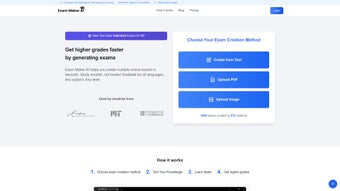
Because Exam Maker AI runs entirely online, there is no traditional installation process. Users start by visiting the official website and creating a free account with an email address or social‑login option. After confirming the account, the dashboard appears, offering a clean, intuitive interface where the “Create New Exam” button is front and center. To generate a test, click the button, then choose the source type: paste raw text, upload a PDF, drag an image file, or paste a YouTube URL. The AI automatically extracts captions from videos when available; otherwise, it prompts the user to upload a subtitle file for optimal results.
Once the material is loaded, a short configuration panel lets you set the number of questions (from 5 up to 100), select the difficulty (Easy, Medium, Hard), and optionally tag the quiz with subject keywords. After confirming, the backend processes the content—usually within 30‑60 seconds for average‑size documents. The generated quiz displays in a preview window where you can edit individual questions, reorder items, or add your own explanations. When satisfied, click “Save & Export.” The exam is stored in your personal library (itemprop="offers") and can be downloaded as a high‑resolution PDF, printed directly, or shared via a secure link that expires after a chosen time frame.
Compatibility is straightforward: because the service is browser‑based, it works on Windows 10/11, macOS Monterey and later, Linux distributions with a modern browser, as well as Android and iOS devices using Chrome, Safari, or Firefox. The only technical requirement is an internet connection with at least 2 Mbps bandwidth for smooth video caption processing. No additional plugins or extensions are needed, and the platform automatically adapts to dark or light mode based on the user’s OS preferences. For power users, the service also supports keyboard shortcuts for quick navigation and a progressive‑web‑app (PWA) install prompt, allowing the site to behave like a native app on desktop or mobile without sacrificing the web‑based update cycle.
Pros, Cons & Frequently Asked Questions
Pros
- Fast AI‑generated quizzes from diverse content types.
- No software download; works on any device with a browser.
- Secure cloud storage with privacy‑first design.
- Collaboration features encourage group study.
- Free tier available with optional premium upgrades for larger batches.
- Responsive design works seamlessly on tablets and smartphones.
- Automatic answer key and scoring simplifies self‑assessment.
Cons
- Question quality depends heavily on the clarity of source material.
- Limited offline functionality; an internet connection is required.
- Advanced customization (e.g., custom feedback per question) is only in paid plans.
- Heavy video processing can be slower on low‑bandwidth connections.
- Currently no native desktop or mobile app, only web access.
FAQ
Is Exam Maker AI really free to use?
Yes, the core features—including unlimited text uploads and up to 20 questions per exam—are free. A premium subscription unlocks larger batches, priority processing, and advanced formatting options.
Can I generate exams from scanned handwritten notes?
Handwritten scans are supported if the image quality is high enough for OCR. For best results, use clear, well‑lit photos or PDFs created with a scanner.
How does Exam Maker AI protect my data?
All uploads are encrypted in transit (HTTPS) and at rest. Private links are token‑based and can be set to expire after a chosen period. The platform does not sell user data to third parties.
Can I edit the generated questions?
Absolutely. After generation, each question appears in an editable grid where you can modify wording, change answer choices, or add explanations before saving.
Is there a mobile app for Exam Maker AI?
Currently the service is web‑only, but the responsive design works seamlessly on smartphones and tablets. A native app is planned for future releases.
Overall Rating: 4.5 out of 5 stars
Exam Maker AI delivers a fast, secure, and highly adaptable solution for students looking to convert their study material into actionable quizzes. The only real limitation is the reliance on clear source content, but this is a reasonable trade‑off for an AI‑driven tool that works across all major operating systems without a download.
Conclusion & Call to Action
In a world where digital learning resources multiply daily, Exam Maker AI stands out as a practical, AI‑enhanced ally for any student aiming to maximise revision efficiency. Its ability to ingest text, PDFs, images, and even video captions means you can centralise all your study assets into one streamlined workflow. The cloud‑native architecture guarantees that you can access your custom exams from a laptop in the library, a tablet in the coffee shop, or a phone on the commute—without worrying about version mismatches or software updates. While the free tier already offers substantial value, the optional premium plan unlocks high‑volume generation and richer formatting, making it suitable for intensive courses or tutoring professionals.
Ready to turn your notes into ready‑made quizzes? Download Exam Maker AI now, create your first test in under a minute, and experience a smarter way to study. Join thousands of students who have already boosted their exam scores by integrating AI‑generated practice exams into their study routine. Don’t let another revision session go to waste—activate your free account today and start generating precise, subject‑specific quizzes instantly.



.png)



